Home/ Projects/ Excel Superstore Sales Analysis
Case Study · Excel · Business Analytics

Excel Superstore
Sales Analysis

A retail business wants to understand which products, regions, and customer segments drive profit — and which are quietly destroying it despite strong revenue numbers.

Excel Advanced 9,994 rows Completed View on GitHub
Completed Project
01 · Business Problem

What's actually driving our profit — and what isn't?

A US-based retail operation sells across three main categories — Technology, Furniture, and Office Supplies — in four geographic regions. Leadership sees strong top-line revenue but suspects margin problems are hidden in the product mix and discount strategy.

The core business questions were: Which categories and sub-categories generate real profit? Which regions underperform? Are we discounting our way into losses?

The analytical challenge: Revenue and profit don't move together in retail. A product can be your top revenue generator and your worst margin destroyer simultaneously. The analysis had to separate these two stories clearly.
02 · Dataset

Superstore Sales Dataset

The dataset contains 9,994 order records with fields covering order date, customer segment, product category and sub-category, geographic region and state, sales revenue, discount applied, quantity, and profit.

9,994
Order records across 4 years of retail sales data
3
Product categories: Technology, Furniture, Office Supplies
4
Geographic regions: East, West, Central, South
17
Product sub-categories analyzed for margin and volume
03 · Process

How the analysis was built

1
Data Cleaning
Removed duplicates, checked for missing values across all 9,994 rows, standardized category names and date formats, created calculated columns for profit margin percentage and discount impact.
2
KPI Framework
Defined core metrics: Total Revenue, Total Profit, Profit Margin %, Average Order Value, Discount Rate, and MoM Growth. Ensured consistent definitions across all PivotTables to avoid conflicting numbers.
3
Segmentation Analysis
Built PivotTables to slice revenue and profit by category, sub-category, region, customer segment (Consumer, Corporate, Home Office), and time period. Cross-referenced discount rates with profit margins to find the correlation.
4
KPI Dashboard
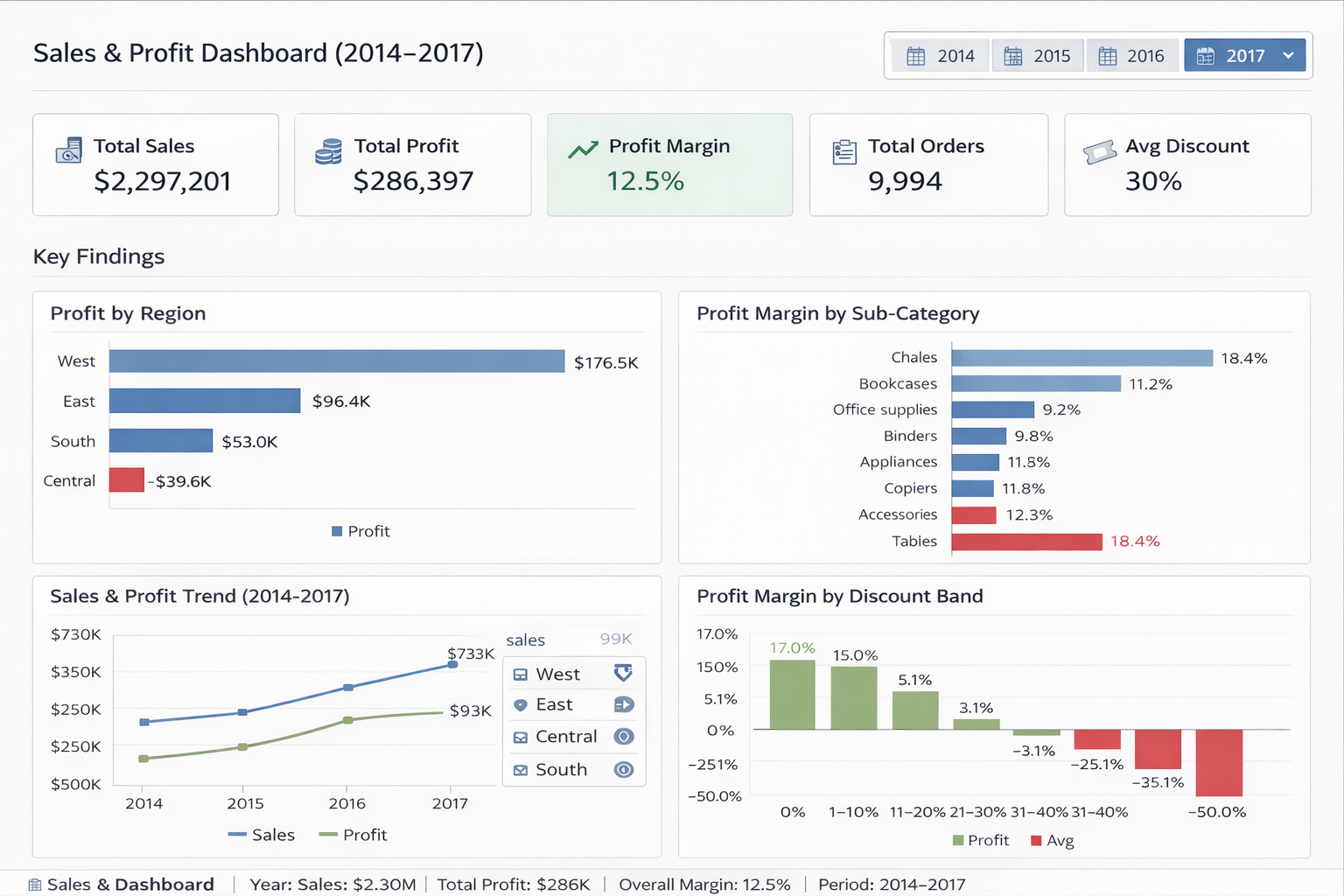
Built an interactive Excel dashboard with slicers for category, region, and time period. Charts included revenue vs profit comparison by category, regional performance heatmap, and top/bottom 5 sub-categories by margin.
04 · Key Findings

What the data revealed

Finding 1 — Furniture's discount problem: Furniture was the second-highest revenue category but had the lowest profit margin. The Tables sub-category had a negative profit margin across all regions. Every discounted Tables sale was a net loss. High sales volume was masking a structural margin problem.
Finding 2 — Technology leads but is inconsistent: Technology drove the highest profit margins overall, but Machines and Copiers showed erratic performance. A small number of large orders skewed the averages — the median profit was far lower than the mean.
Finding 3 — The Central region underperforms consistently: Despite similar sales volumes to the East and West, the Central region showed persistently lower margins. This was not a demand problem — it was a cost or pricing problem specific to that region.
Finding 4 — Discounts above 20% reliably produce negative profit: Analysis of discount rate vs. profit margin showed a clear threshold at 20%. Orders with discounts above 20% averaged negative profit margins across all categories. The discount strategy was not converting volume into profit.
05 · Recommendations

What leadership should do next

  • Immediately cap discounts at 20% across all categories. The data shows this is the profit breakeven threshold — discounts above this level produce losses regardless of volume.
  • Review the Tables sub-category pricing strategy. Either reprice to achieve positive margins or deprioritize the product line. Continuing to sell Tables at current pricing and discount rates is destroying profit.
  • Investigate Central region cost structure. The underperformance is consistent enough to suggest a structural issue — logistics costs, local pricing pressure, or distribution inefficiency.
  • Shift marketing investment toward Office Supplies in the Consumer segment. This combination shows the most consistent margin with high repeat purchase frequency.
  • Use the dashboard's monthly trend slicers to monitor margin changes quarterly and catch discount creep early.

Dashboard Preview

Excel Superstore Sales Dashboard Preview — Carlton Waiti

Tools Used

Excel Advanced PivotTables Power Query XLOOKUP Slicers KPI Dashboard Data Cleaning Conditional Formatting

Skills Demonstrated

Data Cleaning Exploratory Analysis KPI Design Discount Analysis Margin Analysis Regional Segmentation Business Recommendations Dashboard Design

About Carlton Waiti

Data Analyst with Economics & Finance background. Projects rated 9.5–9.8/10. Available for remote roles.

Get In Touch